Xcould: software

all you need is here, cell phones, cameras, gadgets, etc. from all brands

Post Top Ad

Showing posts with label software. Show all posts

Friday, February 24, 2017

Aplikasi Mengembalikan Data Yang Terhapus Di Android

10:37 PM 0
xcould.blogspot.co.id - 7-Data Recovery Suite Enterprise 4.0 Full Version .Pernah mengalami kehilangan file atau dokumen penting di smartphone kamu? Jika pernah, mungkin kita berada pada pengalaman yang sama. Hal yang cukup sulit dilakukan ketika mengembalikkan data yang hilang pada smartphone. Karena tidak semua smartphone dilengkapi dengan fitur recovery data. Oleh sebab itu, yang pernah mengalami kehilangan data di smartphone bisa menggunakan software ini untuk mengembalikan data yang hilang.

Oke langsung saja ini screenshoot aplikasinya :


Oke Tanpa Basa Basi Silahkan Di Download

Read More

Sunday, April 6, 2014

android kitkat untuk komputer

9:04 AM 0

halo kawan selamat malam
ane kali ini mau pposting tentang android untuk pc
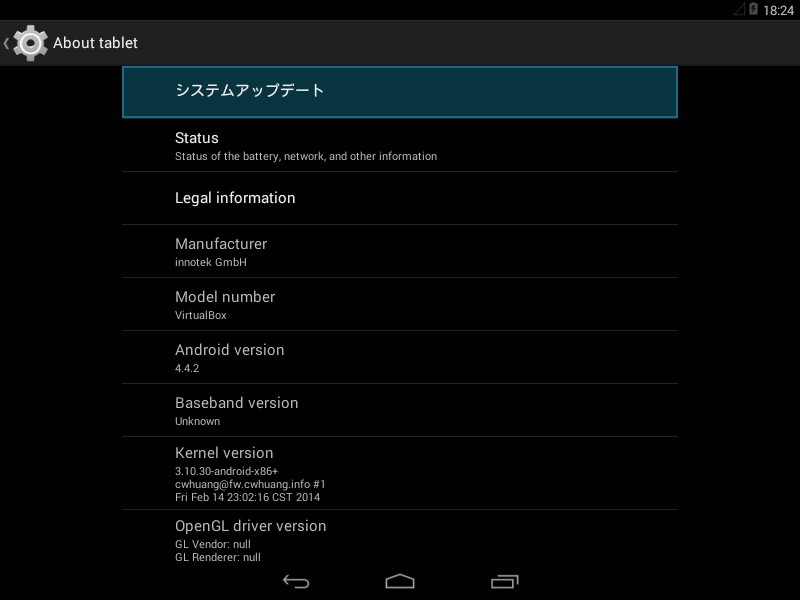
android versi 4.4 / kitkat sudah tersedia untuk pc/ komputer
bisa dijalankan melalui virtual box / langsung diinstall di pc
untuk mendownload ISO nya email saya gratis kog tenang saja kawan : bondanaksel@gmail.com

dibawah ini adalah screenshootnya


Read More

Thursday, March 20, 2014

how to rooting android all type

4:01 PM 0
Are still confused what is rooting android , I love a bit of explanation. Rooting is taken from the root word meaning root, haha .. but is not it, that is, the Root is a system account that has full authority to access and execute all the files, commands, and system on a Linux-based operating system (android also included). The term cool hacking Smartphone Android system so that we have access to the root account. And how to root android which I share here is easy.
Cara Mudah Rooting Android semua type
Main function is to give Android root full rights to the Android system. So by doing Root, users can add, subtract or modify files or data that is located on the original default Android system, and also you can add applications that have been spread crack in the Maya World, do not mind all the way here also there » Andoid application set «.
Still confused?? so the principle is almost the same like the Windows system, we can remove or modify if we log in as Administrator. Dong already confused ntar not finished-finished tutor'nya. : O
Then how the way of rooting Android with ease?? "Actually, there are applications that could Rooting almost all android system" okay immediately wrote to the tutorial. Oh yes you should know, all this comes at a cost gan, but very minimal, and if you are me-rooting your smartphone means the applicable warranty will be lost.

How to Root Android All Type

To carry out all types of Smartphone Rooting android this time I used the softwareUnlockRoot Pro 4.1 Full + Serial Number. This software has support for android version 2.2-2.3, 4.0-4.1, Samsung Galaxy S3, Galaxy Note 2, Google Nexus, and almost all smartphones Android-based. Pengoprasiannya was pretty easy, stay you download, install, and run.
System Requirements:
  • OS: Windows XP/Vista/7/8 (32 and 64 bit)
cara gunakan UnlockRoot

Steps to perform Rooting

1. Download UnlockRoot Pro 4.1 Full + Serial » HERE «
Or Click Image Below!!
Cara Root Android Semua Type
2. Done Download the Install this application to your device or laptop computer.
3. Run and enter the Serial Number which is on Folder Download'an earlier.
4. Then set your Smartphone by going Settings / Settings »Applications» Development / Development »tick" USB debugging mode "
5. Plug your Smartphone to a computer, and if it has been read by the applicationUnlockRoot then just click the "ROOT"
6. Wait until the process is completed, and if completed then your Smartphone will automatically restart, and how to root android has also been FINISHED.
Read More

Wednesday, March 19, 2014

cara mudah root android

3:17 AM 0
Yang masih bingung apa itu rooting android, saya kasih sedikit penjelasannya. Rooting diambil dari kata Root yang artinya akar, haha.. tapi bukan itu, maksudnya adalah, Root merupakan suatu system account yang memiliki kekuasaan penuh untuk mengakses dan mengeksekusi semua file, command dan system pada sistem operasi berbasis linux (android juga termasuk).  Istilah kerennya hacking sistem Android supaya Smartphone kita punya akses ke account root tersebut. Dan cara root android yang saya share disini sangatlah mudah.
Cara Mudah Rooting Android semua type
Fungsi Utama root Android adalah untuk memberi hak penuh ke sistem Android. Jadi dengan melakukan Root, pengguna dapat menambah, mengurangi maupun memodifikasi file-file atau data-data yang terletak pada sistem asli bawaan Android, dan juga Anda bisa menambah aplikasi crack yang sudah tersebar di Dunia Maya, gak usah jauh-jauh disini juga ada »Kumpulan Aplikasi Andoid «.
Masih bingung??  jadi prinsipnya hampir sama kayak system Windows, kita bisa hapus atau memodifikasi kalau kita login sebagai Administrator. Udah dong bingungnya ntar gak selesai-selesai tutor’nya. :o
Lalu bagaimana cara rooting Android dengan mudah?? “Sebenarnya ada aplikasi yang bisa me-Rooting hampir semua system android” oke langsung aja ke tutorialnya. Oh ya perlu anda ketahui, semua ini ada resikonya gan, tapi minim banget, dan jika anda me-Rooting smartphone anda berarti garansi yang berlaku akan hilang.

Cara Root Android Semua Type

Untuk melakukan Rooting semua type Smartphone android kali ini saya menggunakan softwareUnlockRoot Pro 4.1 Full + Serial Number. Software ini sudah support untuk android versi 2.2-2.3, 4.0-4.1, Samsung Galaxy S3, Galaxy Note 2, Google Nexus, dan hampir semua smartphone berbasis Android. Pengoprasiannya pun cukup gampang, tinggal anda download, instal, dan jalankan.
System Requirements :
  • OS:Windows XP/Vista/7/8 (32 dan 64 bit)
cara gunakan UnlockRoot

Langkah-langkah melakukan Rooting

1. Download UnlockRoot Pro 4.1 Full + Serial Number » DI SINI «
Atau Klik Gambar Di bawah ini!!
Cara Root Android Semua Type
2. Selesai Download maka Instal aplikasi ini ke Perangkat Komputer atau laptop anda.
3. Jalankan dan masukkan Serial Number yang ada pada Folder Download’an tadi.
4. Lalu setting Smartphone anda dengan cara masuk Setting/Pengaturan » Aplikasi » Development/Pengembangan » centang “Mode USB debugging”
5. Tancapkan Smartphone anda ke Komputer, dan jika sudah terbaca oleh aplikasi UnlockRootmaka tinggal Klik tombol “ROOT”
6. Tunggu hingga proses selesai, dan jika selesai maka Smartphone anda secara otomatis akan restart, dan cara root android ini pun telah SELESAI.
Read More

Sunday, August 25, 2013

instagram for pc

5:58 PM 0
good morning, selamat pagi teman kali ini ayas akan posting tentang instagram untuk pc , sebenernya gak ada instagram untuk komputer/ tetapi disini saya akan berikan aplikasi untuk akses instagram lewat pc/komputer  yaitu INSTAGRILLE yang dapat mengakses Instagram lewat komputer / pc
Hal yang harus ada adalah koneksi internet ,
berikut screenshotnya :

oke langsung aja downlad instagrille DOWNLOAD


Read More

Wednesday, May 29, 2013

WeChat Untuk Semua Tipe HP

5:20 AM 0
Oke sob langsung aja
Setelah Ane Cari di Mbah Google akhirnya nemu juga
langsung aja Kesini Bro,,
WeChat - The new way to connect
SEDOTTTT >>>>> WeChat
Read More

Sunday, May 26, 2013

Login Komputer dengan Sensor Wajah Kita

11:34 PM 0
Oke langsung aja bos ,,
Ane maw share tentang aplikasi untuk Membuat Login Komputer Yang semula hanya dengan password kita dapat menambahkan sensor wajah kita untuk Login Ke PC
dengan syarat :
1. Terdapat Webcam Pada PC / Laptop
Jika sudah terinstall maka akan menjadi seperti ini Login Pada PC anda
Windows 8 Login, KeyLemon full version, Login menggunakan sensor muka

Oke langsung aja download DISINI
Read More

Post Top Ad